Release Notes TanOS (Version 1.6)
Thank you for choosing Tanium. The following Release Notes document changes between releases of the TanOS software for the Tanium Appliance.
The previous version can be found here: Release_Notes_TanOS_(Version_1.5.0)
TanOS 1.6.7.0085
General Availability Release Date: July 13, 2021
End of Life Date: June 30, 2024
Bug Fixes
- Fixed an issue that could cause Appliance local LDAP authentication to stop working on the secondary Tanium Server in an HA Tanium cluster.
Known Issues and Workarounds
- Appliances must have domain set to complete cluster config. Some cloud appliances may not automatically set domain, requiring manual setting.
- In rare circumstances a physical appliance may fail to boot, hanging at the TanOS boot screen. In this situation it is likely that you need to disable LLDP in the appliance BIOS. Please contact your TAM for further assistance with this process.
- If LACP is enabled on the switch that is connected to the Tanium Appliance, the network interface remains down after the initial configuration. Initial configuration does not yet support NIC team configuration. To avoid this issue, disable LACP from the switch until you can work with your TAM to enable NIC teaming.
Upgrade Considerations
- Minimum TanOS to upgrade from: TanOS 1.5.6 (See https://docs.tanium.com/appliance/appliance/upgrade.html for details on supported upgrade paths).
- See docs.tanium.com for full TanOS upgrade details.
TanOS 1.6.7.0083 (DQ)
General Availability Release Date: July 6, 2021
End of Life Date: June 30, 2024
This version has been removed due to an issue that could cause Appliance local LDAP authentication to stop working on the secondary Tanium Server in an HA Tanium cluster.
Enhancements
- TanOS now automatically updates physical appliance firmware during TanOS upgrade.
- Made uploading large support files (platform core dumps and TanOS support gathers) simpler and more direct, by providing direct SFTP upload from appliances to Tanium.
- Updated OS packages to the latest.
- Includes Tanium Core Platform 7.4.6.1038.
Bug Fixes
- Miscellaneous fixes.
Known Issues and Workarounds
- Appliances must have domain set to complete cluster config. Some cloud appliances may not automatically set domain, requiring manual setting.
- In rare circumstances a physical appliance may fail to boot, hanging at the TanOS boot screen. In this situation it is likely that you need to disable LLDP in the appliance BIOS. Please contact your TAM for further assistance with this process.
- If LACP is enabled on the switch that is connected to the Tanium Appliance, the network interface remains down after the initial configuration. Initial configuration does not yet support NIC team configuration. To avoid this issue, disable LACP from the switch until you can work with your TAM to enable NIC teaming.
Upgrade Considerations
- Minimum TanOS to upgrade from: TanOS 1.5.6 (See https://docs.tanium.com/appliance/appliance/upgrade.html for details on supported upgrade paths).
- See docs.tanium.com for full TanOS upgrade details.
TanOS 1.6.6.0060
General Availability Release Date: April 27, 2021
End of Life Date: June 30, 2024
Enhancements
- Rewrote TanOS TSG (Tanium Support Gatherer) to be faster, more reliable and provide more complete diagnostic data.
- Improved SNMP configuration on the appliance, and included iDRAC SNMP configuration for physical appliances.
- Added a "RR" menu option to all sub-menus that returns the user to the main TanOS menu for easier navigation.
- Added capability to manage HTTPS inbound rules.
- TanOS CLI now enables automated password management tools to manage TanOS users.
- TanOS now accepts download URLs to retrieve TanOS and Tanium platform upgrade RPMs, removing the need to download and upload these RPMs into TanOS.
- Updated OS packages to the latest.
- Includes Tanium Core Platform 7.4.5.1200.
Bug Fixes
- Miscellaneous fixes.
Known Issues and Workarounds
- Appliances must have domain set to complete cluster config. Some cloud appliances may not automatically set domain, requiring manual setting.
- In rare circumstances a physical appliance may fail to boot, hanging at the TanOS boot screen. In this situation it is likely that you need to disable LLDP in the appliance BIOS. Please contact your TAM for further assistance with this process.
- If LACP is enabled on the switch that is connected to the Tanium Appliance, the network interface remains down after the initial configuration. Initial configuration does not yet support NIC team configuration. To avoid this issue, disable LACP from the switch until you can work with your TAM to enable NIC teaming.
Upgrade Considerations
- To use the Appliance Array upgrade you must be on TanOS 1.6.2 or later with an Appliance Array created (Menu 1-M).
- If upgrading from 1.6.2 or 1.6.3, first upgrade the primary Tanium Server to latest TanOS (Menu B-3) to provide the array upgrade feature.
- Upgrade the primary Tanium Server again to start the full Array Upgrade (Menu B-3).
- Minimum TanOS to upgrade from: TanOS 1.5.1 (See https://docs.tanium.com/appliance/appliance/upgrade.html for details on supported upgrade paths).
TanOS 1.6.5.0052
General Availability Release Date: March 2, 2021
End of Life Date: June 30, 2024
Enhancements
- IBM Private Cloud support (using QCow).
- Partition Sync can now be run on all members of an Appliance Array.
- Tanium Platform can now be upgraded using an Appliance Array.
- Appliance Array installs automatically establish trust relationships between Tanium appliances.
- Updated OS packages to the latest.
- Includes Tanium Core Platform 7.4.4.1362.
Bug Fixes
- Miscellaneous fixes.
Known Issues and Workarounds
- After a fresh install of a Tanium Server active-active cluster using an Appliance Array, run Fix ACLS on the secondary Tanium Server (Menu: B-X-3).
- If a Tanium Server Active-Active cluster member is software reset, there is a risk the local Tanium Users on the remaining Tanium Server will be overwritten. To avoid this problem, disconnect the IPSEC tunnel between the Tanium Servers before performing the software reset.
- In rare circumstances a physical appliance may fail to boot, hanging at the TanOS boot screen. In this situation it is likely that you need to disable LLDP in the appliance BIOS. Please contact your TAM for further assistance with this process.
- If LACP is enabled on the switch that is connected to the Tanium Appliance, the network interface remains down after the initial configuration. Initial configuration does not yet support NIC team configuration. To avoid this issue, disable LACP from the switch until you can work with your TAM to enable NIC teaming.
Upgrade Considerations
- You are no longer asked to run a partition sync during upgrade. If available, run partition sync on your appliances before starting your upgrade.
- To use the Appliance Array upgrade you must be on TanOS 1.6.2 or later with an Appliance Array created (Menu 1-M).
- Upgrade the primary Tanium Server manually to TanOS 1.6.4 (Menu B-3).
- No longer required when starting at TanOS 1.6.4 or later.
- Upgrade the primary Tanium Server again to start the full Array Upgrade (Menu B-3).
- Upgrade the primary Tanium Server manually to TanOS 1.6.4 (Menu B-3).
- Minimum TanOS to upgrade from: TanOS 1.5.1 (See https://docs.tanium.com/appliance/appliance/upgrade.html for details on supported upgrade paths).
TanOS 1.6.4.0128
General Availability Release Date: February 2, 2021
End of Life Date: June 30, 2024
Bug Fixes
- Comprehensive backups are no longer blocked by "file changed as we read it" error.
Security Updates
- This release includes security updates. Details of the issues, including affected versions and mitigation information, can be obtained within Tanium's Support Portal or by contacting your TAM.
Known Issues and Workarounds
- If a Tanium Server Active-Active cluster member is software reset, there is a risk the local Tanium Users on the remaining Tanium Server will be overwritten. To avoid this problem, disconnect the IPSEC tunnel between the Tanium Servers before performing the software reset.
- In rare circumstances a physical appliance may fail to boot, hanging at the TanOS boot screen. In this situation it is likely that you need to disable LLDP in the appliance BIOS. Please contact your TAM for further assistance with this process.
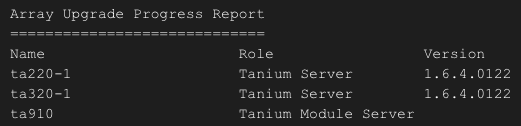
- During an array upgrade, the last array member may return an INFO message and not display the Version in the Array Upgrade Progress Report. This is caused by the reboot of the appliance, the upgrade is complete.
- INFO: Could not send updated information to ta910 (10.20.110.208)
- If LACP is enabled on the switch that is connected to the Tanium Appliance, the network interface remains down after the initial configuration. Initial configuration does not yet support NIC team configuration. To avoid this issue, disable LACP from the switch until you can work with your TAM to enable NIC teaming.

Upgrade Considerations
- To use the Appliance Array upgrade you must be on TanOS 1.6.2 or later with an Appliance Array created (Menu 1-M).
- If you use the alternate partition set for backups, run a Partition Sync on EVERY appliance before you start the upgrade process.
- Upgrade the primary Tanium Server manually to TanOS 1.6.4 (Menu B-3).
- No longer required when starting at TanOS 1.6.4 or later.
- Upgrade the primary Tanium Server again to start the full Array Upgrade (Menu B-3).
- Minimum TanOS to upgrade from: TanOS 1.5.1 (See https://docs.tanium.com/appliance/appliance/upgrade.html for details on supported upgrade paths).
TanOS 1.6.4.0125
General Availability Release Date: January 26, 2021
End of Life Date: June 30, 2024
Enhancements
- Added the ability to upgrade TanOS on all appliances in an array from the primary Tanium appliance. This includes a new TanOS CLI command: array upgrade appliance
- Improved Standby TMS failover.
- PostgreSQL upgraded to version 11.
- VMware Paravirtual SCSI controller is now default on new VMware OVA deployments, and support for existing deployments.
- Improved User Administration Menu.
- Updated BIOS, iDRAC, PERC, NIC firmwares, and OS packages to the latest.
- Tanium Cloud Appliance now supported on AWS GovCloud.
- Ability to restart Operating System services.
Bug Fixes
- Factory Reset has been removed.
- TanOS no longer contacts external DNS servers nightly.
- SNMP credentials are no longer overwritten after upgrade.
- New menu for importing cac.pem file.
- Resolved issue with TanOS menus being unavailable if /tmp is full.
- Resolved issues impacting TMS Sync performance.
- Resolved issue blocking scheduled backups if LDAP certs have been installed.
- Comprehensive backups are no longer blocked by open files.
- Fixed issue preventing SSH port from being opened.
- Fixed issue installing Direct Connect Zone Proxy.
- Resolved additional minor bugs.
- Fixed issue preventing local Tanium user accounts from syncing between Tanium Server appliances.
Known Issues and Workarounds
- In rare circumstances a physical appliance may fail to boot, hanging at the TanOS boot screen. In this situation it is likely that you need to disable LLDP in the appliance BIOS. Please contact your TAM for further assistance with this process.
- During an array upgrade, the last array member may return an INFO message and not display the Version in the Array Upgrade Progress Report. This is caused by the reboot of the appliance, the upgrade is complete.
- INFO: Could not send updated information to ta910 (10.20.110.208)
- If LACP is enabled on the switch that is connected to the Tanium Appliance, the network interface remains down after the initial configuration. Initial configuration does not yet support NIC team configuration. To avoid this issue, disable LACP from the switch until you can work with your TAM to enable NIC teaming.
Upgrade Considerations
- To use the Appliance Array upgrade you must be on TanOS 1.6.2 or later with an Appliance Array created (Menu 1-M).
- If you use the alternate partition set for backups, run a Partition Sync on EVERY appliance before you start the upgrade process.
- Upgrade the primary Tanium Server manually to TanOS 1.6.4 (Menu B-3).
- Upgrade the primary Tanium Server again to start the full Array Upgrade (Menu B-3).
- Minimum TanOS to upgrade from: TanOS 1.5.1 (See https://docs.tanium.com/appliance/appliance/upgrade.html for details on supported upgrade paths).
TanOS 1.6.3.0073
General Availability Release Date: November 3, 2020
End of Life Date: June 30, 2024
Enhancements
- Updated backup options:
- Minimal, Full and Database backups replaced by Core and Comprehensive backups.
- Refer to the Tanium Appliance Deployment Guide at https://docs.tanium.com/appliance/appliance/tanos_backup_guide.html for full details.
- Added a new TanOS CLI that tanadmin users can access through SSH.
- On Tanium Cloud Appliances, SSH key pairs are the default authentication mechanism.
- Health check now warns for missing backup encryption key.
- Added a new TanOS menu to remove root certificates.
- Includes Tanium Core Platform 7.4.4.1250.
Bug Fixes
- Backup encryption keys can now be used by any TanOS user.
- Resolved additional minor bugs.
Known Issues and Workarounds
- DO NOT delete a disk from a virtual appliance or cloud appliance after it has been used to increase storage or enable alternate partitions, even if the alternate partitions are later disabled.
- Do not use the Factory Reset option (TanOS menu B-X-2-2). Please contact your TAM for alternatives if you think this action is necessary.
- If LACP is enabled on the switch that is connected to the Tanium Appliance, the network interface remains down after the initial configuration. Initial configuration does not yet support NIC team configuration. To avoid this issue, disable LACP from the switch until you can work with your TAM to enable NIC teaming.
Upgrade Considerations
- Minimum TanOS to upgrade from: TanOS 1.4.0 (See https://docs.tanium.com/appliance/appliance/upgrade.html for details on supported upgrade paths).
TanOS 1.6.2.0072
General Availability Release Date: September 29, 2020
End of Life Date: June 30, 2024
Enhancements
- Tanium Cloud Appliance now supported on Microsoft Azure.
- When installing Tanium Core Platform components in an Appliance Array, you can now upload the RPM files to the primary Tanium Server, and the array will copy the correct RPM files to the respective appliances (not supported on upgrade).
- Health Check results now written to /outgoing directory.
Bug Fixes
- Resolved issue where TDownloader failed to retrieve some files from content.tanium.com.
- Resolved issue with tancomm user preventing creation of Appliance Arrays.
- Resolved numerous additional minor bugs.
Known Issues and Workarounds
- DO NOT delete a disk from a virtual appliance or cloud appliance after it has been used to increase storage or enable alternate partitions, even if the alternate partitions are later disabled.
- Do not use the Factory Reset option (TanOS menu B-X-2-2). Please contact your TAM for alternatives if you think this action is necessary.
- If LACP is enabled on the switch that is connected to the Tanium Appliance, the network interface remains down after the initial configuration. Initial configuration does not yet support NIC team configuration. To avoid this issue, disable LACP from the switch until you can work with your TAM to enable NIC teaming.
Upgrade Considerations
- Minimum TanOS to upgrade from: TanOS 1.4.0 (See https://docs.tanium.com/appliance/appliance/upgrade.html for details on supported upgrade paths).
TanOS 1.6.1.0101
General Availability Release Date: August 4, 2020
End of Life Date: June 30, 2024
Enhancements
- Tanium Cloud Appliance (AWS) now available.
- Additional disk storage can now be added to virtual appliances.
- New virtual appliances now ship with only one 500GB partition set.
- Alternate partition set can be enabled on new virtual appliance deployments.
- Alternate partition set can be disabled on upgraded virtual appliances.
- SSH known_hosts file can be edited for system users.
- Improved physical appliance firmware update workflow.
- Includes Tanium Core Platform 7.4.3.1242.
Known Issues and Workarounds
- DO NOT delete a disk from a virtual appliance or cloud appliance after it has been used to increase storage or enable alternate partitions, even if the alternate partitions are later disabled.
- Do not use the Factory Reset option (TanOS menu B-X-2-2). Please contact your TAM for alternatives if you think this action is necessary.
- If LACP is enabled on the switch that is connected to the Tanium Appliance, the network interface remains down after the initial configuration. Initial configuration does not yet support NIC team configuration. To avoid this issue, disable LACP from the switch until you can work with your TAM to enable NIC teaming.
Upgrade Considerations
- Minimum TanOS to upgrade from: TanOS 1.5.0 (See https://docs.tanium.com/appliance/appliance/upgrade.html for details on supported upgrade paths).
TanOS 1.6.0.0270
General Availability Release Date: June 9, 2020
End of Life Date: June 30, 2024
Enhancements
- Tanium Appliances can be grouped into Appliance Arrays to significantly simplify Tanium installation.
- Tanium can now be deployed from a single appliance, to all members of an Appliance Array using the Tanium Installation > Manage Appliance Array menu (Tanium Zone Server Hub and secondary Tanium Module Server are not yet supported).
- TanOS users can now be configured to only use public key authentication, password disabled.
- Users with the tanadmin role can configure public key authentication using ssh-copy-id.
- Added support for IPv6.
- Re-enabled NIC teaming support.
- Users with the tanadmin role can now reset the password of other tanadmin users.
- Improved the TanOS Upgrade menu to minimize downtime; Tanium services are not stopped until you confirm the TanOS version.
- ARP table capacity adjusted to accommodate large sub-networks
- Updated BIOS, iDRAC, PERC, NIC firmwares, and OS package to the latest.
- TanOS includes Tanium 7.4.2.2063 and Tanium 7.3.314.4283.
Known Issues and Workarounds
- Do not use the Factory Reset option (TanOS menu B-X-2-2). Please contact your TAM for alternatives if you think this action is necessary.
- If LACP is enabled on the switch that is connected to the Tanium Appliance, the network interface remains down after the initial configuration. Initial configuration does not yet support NIC team configuration. To avoid this issue, disable LACP from the switch until you can work with your TAM to enable NIC teaming.
Upgrade Considerations
- Minimum TanOS to upgrade from: TanOS 1.5.0 (See https://docs.tanium.com/appliance/appliance/upgrade.html for details on supported upgrade paths).
- Customers with appliances in a Tanium cluster (two Tanium Server appliances with clustered Tanium Server and database) should upgrade the appliance hosting the primary database first.