SSL TLS Server Audit Documentation
Introduction: Core Content - SSL/TLS Server Audit
- Core Content - SSL/TLS Server Audit content is deprecated and will no longer receive new improvements. This content will be removed in a future release.
While performing inventory operations on secure servers within the enterprise, it is also beneficial to ensure these servers adhere to approved encryption standards and to verify their certificates expiration dates. Tanium's Core Content SSL/TLS Server Audit solution provides the tools needed to perform audits of SSL and TLS Network Services and presented Digital Certificates.
Important
- Usage of this content on non-windows endpoints requires that the 'lsof' package be present on the endpoint.
Release Notes
The release notes for this version are at https://kb.tanium.com/Category:Tanium_Initial_Content
Download Location
This content is available for installation or upgrade within the Tanium Console's Solution page on supported on-premise Tanium installations. It is included by default with Tanium Cloud installations.
Supported Tanium Platforms
Tanium Server 7.5 and newer.
Usage
Overview
The Tanium SSL/TLS Server Audit solution provides the tools to help audit SSL/TLS Network Services running on a Tanium managed system. It will:
- Enumerate all interfaces
- Identify all listening services
- Interrogate all listening services for SSL or TLS usage
- Record the Key Exchange
- Record the Cipher Suites
- Record the Certificate Exchange
All discovered information is recorded in a local database, which can be queried with Tanium sensors.
Pre-Requisites
For Windows, Linux, and Mac, this content requires Tanium Core Python
- Windows, Linux, Mac: Deploy the Python - Tools [OS] package.
For Solaris and AIX, the endpoint must have an instance of Python 3 installed separately from Tanium Core Python.
Setup
Get SSL Server Audit Tools on Your Endpoints
You can configure your SSL Server Audit Tools to be automatically distributed via ECF.
Confirm that Core Content - SSL/TLS Server Audit is imported into included in your instance.
Navigate to Administration>Action Groups.
Filter for Core Content - SSL Audit. If this Action group appears in the list of Actions Groups, it means Core Content – SSL Server Audit is installed.
If this Action Group is not in the list, see. Installing Core Content - SSL/TLS Server Audit.
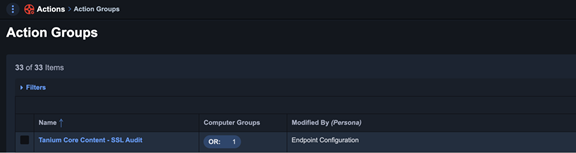

Identify the computer groups to which you want to apply the tools.
Navigate to Administration>Action Groups.
Filter for Core Content - SSL Audit.
Select Tanium Core Content – SSL Server Audit.
Under Computer Groups, filter for the group you want to add to the Action Group.
Select the Computer Group and click Save.
Note: The default computer group for Tanium Core Content - SSL Audit Action Group is No Computers.
After the correct Computer Groups are added, the SSL Server Audit Tools are installed, but no scans are run.
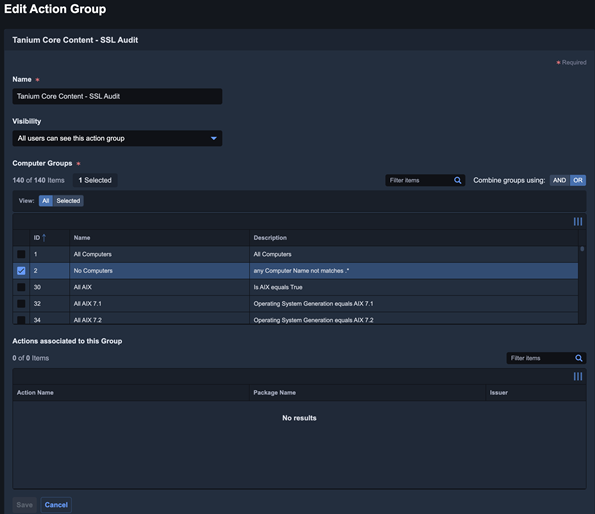

Run SSL Scans
After the SSL Server Audit Tools are installed, you need to create scheduled actions to run the SSL scans.
Navigate to Administration>Packages.
Filter for SSL Server Audit.
Select the checkbox for SSL Server Audit - Windows.
Click Deploy Action.
Configure the following fields.
See Deploying actions in Console and Interact for more information on Deploy Action configuration parameters.Deployment Package: SSL Server Audit Windows.
Schedule Type: Recurring Deployment.
Reissue Interval: Determines how often the system is scanned for later retrieval by a sensor. Set a value appropriate for your environment.
Action Group: Tanium Core Content – SSL Audit
Click Deploy Action.
Repeat step 3 for Deployment Package: SSL Server Audit - non Windows.


The Scheduled Actions appear in your action group (Administration>Action Groups). Recurring deployments set to the Tanium Core Content - SSL Audit Action Group during the Deploy Action step automatically appear in this list.
You can now use the sensors included in SSL Server Audit, including SSL Server Protocols. These sensors are accurate to the reissue interval of your scheduled actions you created.
Installing Core Content - SSL/TLS Server Audit
If Tanium Core Content - Server Audit does not appear within Action Groups in your deployment, it may have been deleted. For on-premises customers, you can reimport Core Content - SSL Audit via Tanium Solutions.
For Cloud Customers, contact Tanium Support for help getting this content reinstalled.
Questions
SSL Server Audit Tools Install State
Get SSL Server Audit Tools Required matches "^((Not )?Installed|Required|Version|Unavail|Tanium).*$" from all machines
Lists states of endpoints where SSL Server Audit Tools are not installed or up to date.
SSL Server Audit Tools Install State - Non-Windows
Get SSL Server Audit Tools Required matches "^((Not )?Installed|Required|Version|Unavail|Tanium).*$" from all machines with Is Windows equals false
Lists states of non-Windows endpoints where SSL Server Audit Tools are not installed or up to date.
SSL Server Audit Tools Install State - Windows
Get SSL Server Audit Tools Required matches "^((Not )?Installed|Required|Version|Unavail|Tanium).*$" from all machines with Is Windows equals true
Lists states of Windows endpoints where SSL Server Audit Tools are not installed or up to date.
SSL Server Certificate Details
Get SSL Server Certificate Details from all machines with SSL Server Certificate Details matches "^[0-9].*"
Returns the port number, certificate start and expiration dates, subject, issuer, authorization status, root authority name, and root authority key identifier of all discovered SSL or TLS servers.
SSL Server Certificate Expiry
Get SSL Server Certificate Expiry from all machines with SSL Server Certificate Expiry matches "^[0-9].*"
Returns the port number and days until certificate expiration of all discovered SSL or TLS servers.
SSL Server Certificate Extended Key Usage
Get SSL Server Certificate Extended Key Usage from all machines with SSL Server Certificate Extended Key Usage matches "^[0-9].*"
Returns the port number and extended key usage configuration of all discovered SSL or TLS servers.
SSL Server Certificate Key Usage
Get SSL Server Certificate Key Usage from all machines with SSL Server Certificate Key Usage matches "^[0-9].*"
Returns the port number and certificate key usage configuration of all discovered SSL or TLS servers.
SSL Server Certificate Public Key Details
Get SSL Server Certificate Public Key Details from all machines with SSL Server Certificate Public Key Details matches "^[0-9].*"
Returns the port number, algorithm, and key size of all discovered SSL or TLS servers.
SSL Server Certificate Signature Algorithm Details
Get SSL Server Certificate Signature Algorithm Details from all machines with SSL Server Certificate Signature Algorithm Details matches "^[0-9].*"
Returns the port number, signature algorithm, and hash algorithm of all discovered SSL or TLS servers.
SSL Server Cipher Suite
Get SSL Server Cipher Suite matches "^(SSL [2,3].0|TLS 1.[0-2]).*$" from all machines with SSL Server Cipher Suite matches "^(SSL [2,3].0|TLS 1.[0-2]).*$"
Returns the protocol, cipher suite, compression method, client certificate requested (true or false), and port number of all discovered SSL or TLS servers.
SSL Server Key Exchange
Get SSL Server Key Exchange matches "^(SSL [2,3].0|TLS 1.[0-2]).*$" from all machines with SSL Server Key Exchange matches "^(SSL [2,3].0|TLS 1.[0-2]).*$"
Returns the protocol, cipher suite, key length, and port number of all discovered SSL or TLS servers.
SSL Server Protocols
Get SSL Server Protocols matches "^(SSL [2,3].0|TLS 1.[0-2])$" from all machines with SSL Server Protocols matches "^(SSL [2,3].0|TLS 1.[0-2])$"
Returns the server protocols of all discovered SSL or TLS servers.
SSL Server Root Certificate Authority
Get SSL Server Root Certificate Authority from all machines with SSL Server Root Certificate Authority matches "^[0-9].*"
Returns the port number and subject key identifier of all discovered SSL or TLS servers.
SSL Servers Vulnerable to BEAST attack (2011)
Get?forceComputerIdFlag=1 SSL Server Cipher Suite matches ^TLS 1.0.* from all machines with SSL Server Cipher Suite matches ^TLS 1.0.*
Returns the protocol, cipher suite, compression method, client certificate requested (true or false), and port number of all discovered SSL or TLS servers that appear to be vulnerable to the BEAST attack.
SSL Servers Vulnerable to Logjam attack (May 2015)
Get?forceComputerIdFlag=1 SSL Server Cipher Suite matches .*TLS_DHE_.*EXPORT.* from all machines with SSL Server Cipher Suite matches .*TLS_DHE_.*EXPORT.*
Returns the protocol, cipher suite, compression method, client certificate requested (true or false), and port number of all discovered SSL or TLS servers that appear to be vulnerable to the Logjam attack.
SSL Servers Vulnerable to POODLE attack against SSL (October 2014)
Get?forceComputerIdFlag=1 SSL Server Cipher Suite matches ^SSL 3.0.* from all machines with SSL Server Cipher Suite matches ^SSL 3.0.*
Returns the protocol, cipher suite, compression method, client certificate requested (true or false), and port number of all discovered SSL or TLS servers that appear to be vulnerable to the POODLE attack.
SSL Servers Vulnerable to ROBOT (December 2017)
Get?forceComputerIdFlag=1 SSL Server Cipher Suite contains TLS_RSA from all machines with SSL Server Cipher Suite contains TLS_RSA
Returns the protocol, cipher suite, compression method, client certificate requested (true or false), and port number of all discovered SSL or TLS servers that appear to be vulnerable to the ROBOT attack.
SSL Servers Vulnerable to TLS CRIME Attack (2012)
Get?forceComputerIdFlag=1 SSL Server Cipher Suite contains deflate from all machines with SSL Server Cipher Suite contains deflate
Returns the protocol, cipher suite, compression method, client certificate requested (true or false), and port number of all discovered SSL or TLS servers that appear to be vulnerable to the TLS CRIME attack.
SSL Servers Vulnerable to Vulnerable to TLS DROWN attack (2016)
Get?forceComputerIdFlag=1 SSL Server Cipher Suite matches .*SSL 2.0.* from all machines with SSL Server Cipher Suite matches .*SSL 2.0.*
Returns the protocol, cipher suite, compression method, client certificate requested (true or false), and port number of all discovered SSL or TLS servers that appear to be vulnerable to the TLS DROWN attack.
Packages
The Core Content SSL / TLS Server Audit packages are distributed in the Python 2 content set.
SSL Server Audit - non Windows
Performs an SSL / TLS Server Audit on a non-Windows endpoint.
Note: In order to avoid extraneous logging, the SSL Server Audit - Add Port Exclusions package can be used to exclude the Tanium port during Audit.
SSL Server Audit - Windows
Performs an SSL / TLS Server Audit on a Windows endpoint.
Note: In order to avoid extraneous logging, the SSL Server Audit - Add Port Exclusions package can be used to exclude the Tanium port during Audit.
SSL Server Audit Add Port Exclusions [Non-Windows]
Adds ports to a list of excluded port that will not be audited by the SSL / TLS Server Audit on a non-Windows endpoint.
SSL Server Audit Add Port Exclusions [Windows]
Adds ports to a list of excluded port that will not be audited by the SSL / TLS Server Audit on a Windows endpoint.
SSL Server Audit Delete Port Exclusions [Non-Windows]
Deletes the list of excluded port that will not be audited by the SSL / TLS Server Audit on a Windows endpoint.
SSL Server Audit Delete Port Exclusions [Windows]
Deletes the list of excluded port that will not be audited by the SSL / TLS Server Audit on a Windows endpoint.
SSL Server Audit Deploy - Windows
Deploys the tools used by the SSL / TLS Server Audit on a Windows endpoint.
SSL Server Audit Deploy - non Windows
Deploys the tools used by the SSL / TLS Server Audit on a Windows endpoint.
SSL Server Audit Drop Tables - Windows
Resets the database used by the SSL / TLS Server Audit on a Windows endpoint.
SSL Server Audit Drop Tables - non Windows
Resets the database used by the SSL / TLS Server Audit on a non-Windows endpoint.
SSL Server Audit Remove Tools
Removes the tools used by the SSL / TLS Server Audit from a Windows endpoint.
SSL Server Audit Remove Tools - non Windows
Removes the tools used by the SSL / TLS Server Audit from a non-Windows endpoint.
Sensors
The Core Content SSL / TLS Server Audit sensors are distributed in the Python 2 content set, Miscellaneous category.
Miscellaneous
SSL Server Audit Age
Returns age of the audit data in days.
Example: 91-180
SSL Server Audit Port Exclusions
It is possible to configure a particular endpoint to exclude specific ports from the audit scan if the target application is too fragile to scan. This sensor returns the exclusions applied on a particular endpoint.
Example: 443,8443
SSL Server Audit Python Exists
Confirms that a valid python interpreter exists on the ednpoint.
SSL Server Audit Tools Required
SSL Server Audit tools - can be used to target installs/updates
 Not Installed: not been deployed or pieces missing

 Version Incorrect: was previously deployed, but an older version

 Required: either Not Installed OR Incorrect Version

 Unavailable: not available for the OS

 Installed: already deployed
SSL Server Certificate CA Short Name
This sensor returns a shortened Certificate Authority name, used by Tanium Risk to populate its dashboards.
SSL Server Certificate Details
Return SSL Server Certificate Details for all open ports audited.
Example: 443~2019-12-24~2021-12-24~Organizational Unit: AndyLab, Locality: Sandhurst, State/Province: England, Country: GB~Common Name: andylab-LAB-DC04-CA; Domain Component: andylab, local~unauthorised~none~none
SSL Server Certificate Expiry
Returns bucketed number of days until certificate expires.
Example: 443,91-180
SSL Server Certificate Extended Key Usage
Return the Extended Key Usage field for the certificates on each ssl-server-audit-port-exclusions.py
Example: 443~server_auth,client_auth
SSL Server Certificate Issuer
Returns the issuer of the certificate for the port specified in the parameter.
Example: Common Name: acme-ACME-DC01-CA; Domain Component: acme, lab
SSL Server Certificate Key Usage
Returns the key usage fields for the certificate.
Example: 443~digital_signature,key_encipherment,key_cert_sign
SSL Server Certificate Public Key Details
Return Key length and algorithm for the public key presented on each port.
Example: 8088~rsa~2048
SSL Server Certificate Signature Algorithm Details
Return signature algorithm and hash algorithm for the certificates used along with the associated port.
Example: 8089~rsassa_pkcs1v15~sha256
SSL Server Certificate Subject
Returns the subject field of the certicate in use on the port given as a parameter.
Example: Common Name: www.tanium.com
SSL Server Cipher Suite
Returns the SSL Protocol and available cipher suites available on each port.
Example: TLS1.2~TLS_ECDHE_RSA_WITH_AES_128_GCM_SHA256~deflate~false~8089
SSL Server Enhanced Certificate Details
Return Enhanced Certificate Details.
Example: 443~2019-12-24~2021-12-24~rsa~2048~rsassa_pkcs1v15~sha256~Organizational Unit: AndyLab, Locality: Sandhurst, State/Province: England, Country: GB~Common Name: andylab-LAB-DC04-CA; Domain Component: andylab, local~unauthorised~none~none~140000000c2cf994f1b11f23bb00000000000c~710830c33964b526dd4831a5988ade0b5905b7ed
SSL Server Key Exchange
Returns the Key Exchange parameters for each port in use.
Example: TLS1.2~TLS_ECDHE_RSA_WITH_AES_128_CBC_SHA~520~443
SSL Server Protocols
List ports and supported SSL/TLS Protocols.
Example: 443,TLS1.2
SSL Server Root Certificate Authority
Returns the status of the CA used to sign each ssl-server-root-certificate-authority.py
Example: 3389~self signed