IMPORTANT: This site is planned to be decommissioned in 2026. Visit the Tanium Resource Center for all Tanium release notes, user guides, and support information. To view release notes in the Resource Center, see Tanium Release Notes.
IMPORTANT: If you are using semi-annual releases for on premises, see the Release notes for 2024H1 semiannual release, Release notes for 2024H2 semiannual release, or Release notes for 2025H1 semiannual release on the Tanium Resource Center.
Effective October 15, 2024: On prem release notes on the Tanium Knowledge Base are frozen. For release notes related to 7.4 or 7.5 Server and Solutions, see the Monthly updates for Tanium Version 7.4 and 7.5 Server and Solutions on the Tanium Resource Center.
Release Notes Asset (Version 1.1)
Thank you for choosing Tanium. This article documents changes between releases of Tanium Asset.
Tanium Asset 1.1.0.0036
Release Date: January 30, 2018
Bug Fixes
- Resolved CPU Details sensor issue for AIX and Solaris. A value of 0 was returned for CPU Speed.
- Resolved issues in Network Detail and Disk Details sensors that resulted in empty rows.
- Resolved load failures with ServiceNow destination that occurred when the connection timed out or the connection reset.
- Resolved issue with ServiceNow destination. AIX software titles were not populated in some instances.
- Resolved load failures in single column multi-value sensors.
- Resolved load issue that caused empty rows to be populated in the Asset database when errors were removed for all values.
- Resolved issue where the Asset service may not start correctly after installation or upgrade.
- Resolved issue where the user was unable to modify an existing attribute.
- Resolved issue where the user was unable to edit the columns for a multi-column sensor after being added.
- Resolved issue where sometimes the user cannot click the drilldown link from the report page.
Known Issues and Workarounds
- The ServiceNow destination might exhibit problems with custom business rules applied to configuration items that are being loaded. In ServiceNow, you can create custom business rules. These business rules might prevent or roll back the addition of records made by Tanium. You might need to adjust the business rules for Asset to update ServiceNow. Ask your TAM for more information.
- Asset 1.1 is the first version to support running the Tanium Module Server on non-English Windows servers. To support Asset on a non-English Windows server:
- Do not upgrade from Asset 1.0.0 or 1.0.1. Uninstall the previous version of Asset, then install Asset 1.1.0.
- Force the PG_CTL binary that initializes the Asset database to use the default English localization.
- Stop the Tanium Asset service.
- Go to the directory on the Module Server where the PG_CTL utility keeps its localization files, for example: C:\Program Files\Tanium\Tanium Module Server\services\asset-service\psql\share
- Rename the locale, for example locale_backup
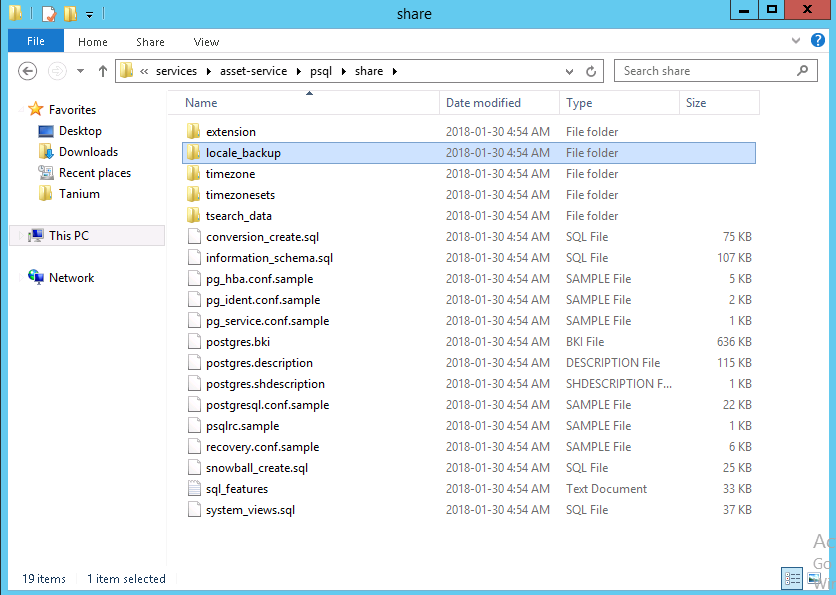
Renaming this directory ensures that the status messages returned by the PG_CTL utility are returned in English. - Start the Tanium Asset service. The Asset database is then initialized.
